- Tel: +86-15305875100
- E-mail: [email protected]
- Please contact us if you have questions.
CONTACT US


 English
 Español

Industry News
Sep 04,2026
What Is a Flat Touch Switch Panel Used For
Control panels are changing as modern vehicles and equipment become more organized and visually integrated. Traditional rows of separate switches can take up noticeable space and may create a busy appearance. A flat touch switch panel offers another approach. It brings several controls together on a single panel while keeping the surface visually clean.
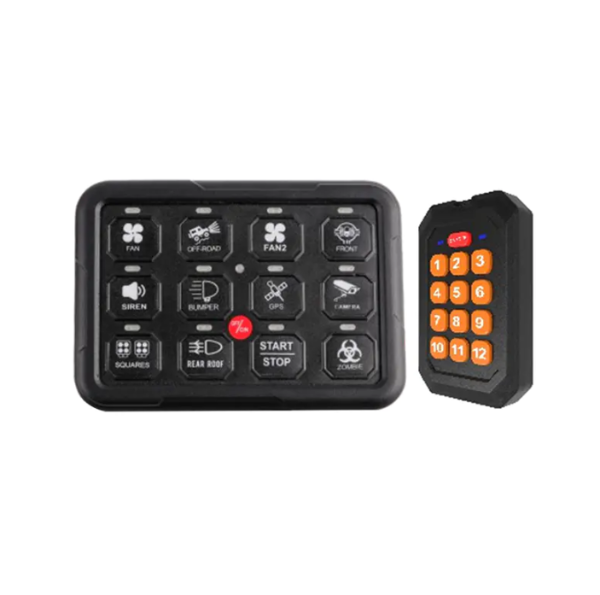
Flat touch switch panels are often associated with vehicle interiors, custom dashboards, utility equipment, and other applications where several functions need to be controlled from one location. Their value is not limited to appearance. Panel layout, switch identification, accessibility, and installation can all influence how useful the product becomes.
The growing interest in compact control layouts also gives manufacturers more opportunities to develop panels for specific applications. Instead of treating every control panel in the same way, designers can consider the space, functions, and users before selecting a suitable solution.
What Is a Flat Touch Switch Panel Designed to Do?
It is used to bring multiple controls together in a compact interface. Instead of installing individual switches throughout a dashboard or control area, several functions can be arranged on one panel.
The panel can provide a more organized way to access different functions. Depending on the application, it may be used to operate lighting, auxiliary equipment, fans, pumps, communication-related functions, or other vehicle and equipment accessories.
Its role can be understood through several common purposes:
Centralized control
Several functions can be placed within one convenient area.
Cleaner panel layout
A flat surface can create a more organized visual appearance.
Clear identification
Labels or symbols can help users recognize different controls.
Space management
Multiple functions can be arranged without requiring a separate mounting position for every switch.
Application flexibility
The panel can be designed around different vehicle or equipment layouts.
This makes the product more than a collection of switches. It becomes part of the overall control interface.
For designers, the panel can also influence how users interact with a vehicle or piece of equipment. The position of each control, the order of functions, and the way information is displayed can all affect the experience.
Where Are Flat Touch Switch Panels Commonly Used?
It can be found in different environments where several controls need to be grouped together. Vehicle applications are an important area because dashboards and interior panels often have limited space.
Custom vehicles can also benefit from this type of control arrangement. A vehicle used for outdoor activities may have additional lighting or auxiliary equipment. A performance vehicle may require a different control layout. Utility vehicles can have their own set of operating functions.
Some common application areas include:
| Application Area | Possible Use of a Flat Touch Switch Panel |
|---|---|
| Custom Vehicles | Organize additional vehicle functions |
| Off-Road Vehicles | Group controls for auxiliary equipment |
| Racing Vehicles | Provide a compact control area |
| Utility Vehicles | Centralize frequently used functions |
| Recreational Vehicles | Manage several interior or exterior functions |
| Specialty Equipment | Combine multiple controls in one location |
| Workshop Equipment | Support organized equipment operation |
The actual functions can vary from one application to another. The important point is that the panel gives designers a way to arrange several controls within a defined area.
This flexibility is useful when a standard dashboard does not provide enough room or does not match the intended function layout.
How Does a Flat Touch Switch Panel Help Organize Vehicle Controls?
Vehicle dashboards can become crowded when additional accessories are added. Separate switches may need individual mounting locations, labels, and wiring arrangements. As the number of functions grows, the dashboard can become harder to organize.
A switch panel provides a centralized alternative. Controls can be placed together in a planned arrangement. This can make the dashboard look more connected and help users identify related functions.
A well-planned layout may group controls according to how they are used.
For example:
- Lighting controls can be placed together.
- Auxiliary equipment controls can share another area.
- Cabin-related functions can have their own section.
- Frequently used controls can be positioned where they are easy to reach.
- Less frequently used functions can occupy another part of the panel.
This type of organization can be useful in custom vehicle projects. Designers are not limited to the layout of a standard dashboard.
The panel can also contribute to a more consistent interior appearance. When controls share a common surface and visual style, the dashboard may appear less cluttered.
Why Is Panel Layout Important?
The usefulness of a control panel depends partly on how the controls are arranged. A panel may contain many functions, but users still need to understand what each control does.
This is where layout becomes important. Labels, symbols, spacing, and grouping can help create a more understandable interface.
A thoughtful layout can address several needs:
Recognition: Users should be able to identify controls without unnecessary searching.
Reach: Frequently used controls should be placed in convenient positions.
Grouping: Related functions can be located near each other.
Visual balance: The panel can remain organized even when several controls are included.
Adaptability: The layout can be adjusted to suit different vehicles or equipment.
The design does not need to be complicated. Simple organization can often make a control area easier to understand.
This is especially relevant when a panel is installed in a vehicle that already contains factory controls. The additional panel should fit into the existing interior rather than create another visually confusing area.
Can Flat Touch Switch Panels Be Used in Custom Vehicles?
Custom vehicles often have requirements that differ from standard production models. Owners and builders may add lighting, communication equipment, auxiliary systems, or other accessories. These additions can create a need for more controls.
A switch panel gives designers an opportunity to organize those extra functions.
Instead of adding individual switches wherever space is available, several controls can be planned as one group. This can make the installation look more intentional.
Custom vehicle applications can include:
Off-road builds
Additional lights and equipment may require dedicated controls.
Performance vehicles
A compact control area can help organize specialized functions.
Recreational vehicles
Interior and exterior accessories can be managed from a shared panel.
Utility vehicles
Work-related equipment may require several additional controls.
Special-purpose vehicles
The control layout can be designed around the particular job of the vehicle.
The appeal of a switch panel in these applications is its ability to combine function with appearance.
A custom vehicle often receives attention not only for what it can do but also for how the interior is arranged. A control panel can become part of that overall design.
How Can Flat Touch Switch Panels Support Outdoor Equipment?
Outdoor equipment often needs controls that are easy to identify and access. Utility vehicles, recreational equipment, and off-road applications may have several additional functions that are not found in ordinary passenger vehicles.
A centralized panel can provide a practical location for those controls.
Outdoor applications may include lighting, auxiliary equipment, ventilation, and other vehicle accessories. Grouping these functions can help users understand which controls are available.
The panel can also give designers more freedom when deciding where the controls should be located. Rather than fitting individual switches into whatever space remains, a complete panel can be considered during the design process.
Several design considerations can become important:
- Visibility: Labels should be easy to recognize.
- Accessibility: Controls should be positioned within a practical reach.
- Organization: Related functions can be grouped together.
- Surface design: The panel should fit the surrounding interior or equipment.
- Installation: The panel should work with the available mounting area.
The exact requirements depend on the equipment. A recreational vehicle may need a different arrangement from a utility vehicle. This is another reason application-specific panel design continues to attract attention.
What Makes Flat Touch Switch Panels Different From Separate Switches?
Individual switches remain useful for many applications. They are simple and can be installed in different locations. However, adding many separate switches can make a control area look fragmented.
A switch panel takes a different approach. Several controls are presented as part of a single interface.
| Control Approach | Separate Switches | Flat Touch Switch Panel |
|---|---|---|
| Visual Layout | Individual elements | Unified panel appearance |
| Control Grouping | Depends on installation | Designed as a control group |
| Space Planning | Requires separate positions | Uses one organized panel area |
| Labeling | Can vary by switch | Can follow a shared design |
| Custom Appearance | Depends on individual components | Can be designed as one visual unit |
| Application Layout | Often assembled separately | Can be planned around the vehicle |
Neither approach is suitable for every situation. The choice depends on the product, installation space, number of functions, and user requirements.
For applications with several related controls, a unified panel can make the overall design easier to organize.
Should Flat Touch Switch Panels Be Customized for Different Applications?
A single panel design may not suit every vehicle or equipment layout. Different products have different dashboard shapes, available space, control requirements, and user habits.
Customization can address these differences.
A manufacturer may work with buyers to consider:
Control Arrangement
The order and grouping of controls can be planned around the way the user operates the equipment.
Panel Appearance
The surface can be designed to match the surrounding dashboard or equipment.
Labels and Symbols
Different applications may require different names, icons, or markings.
Installation Location
The available mounting area can influence the panel's shape and overall arrangement.
Number of Functions
A small vehicle may need only a few controls, while specialized equipment may require a more extensive control area.
Customization is particularly useful for manufacturers producing equipment for a specific market. Instead of adapting a general panel to an unusual installation, they can consider the control interface during product development.
This can also help create a stronger connection between the panel and the finished product.
What Should Buyers Consider When Choosing a Flat Touch Switch Panel?
Buyers can begin by identifying how the panel will be used. The right choice depends on more than the number of controls.
A practical purchasing process can include several questions.
1. What functions need to be controlled?
List the equipment and accessories that need dedicated controls. This provides a clear starting point for panel planning.
2. Where will the panel be installed?
The available dashboard or mounting space can affect the panel design.
3. Who will use the controls?
A professional operator may have different habits from a recreational vehicle owner. User behavior can influence control placement.
4. Are labels important?
Clear identification can help users understand the function of each control.
5. Is customization required?
A standard panel may work for a common application. A specialized vehicle or equipment project may need a customized arrangement.
6. How should the panel fit the surrounding design?
The panel is visible to the user, so its appearance can influence the overall look of the control area.
These questions can help buyers move beyond a simple product comparison. They encourage a closer look at how the panel will actually be used.
How Are Flat Touch Switch Panels Becoming Part of Modern Control Design?
Control panels are no longer treated only as functional components. Their appearance and organization can influence the way users experience a vehicle or piece of equipment.
It fit this shift by combining several controls into a unified surface. They can help manage space while giving designers more freedom over the appearance and arrangement of the control area.
This is particularly relevant to custom vehicles and specialized equipment. As more accessories are added to a vehicle, the need for organized control becomes more noticeable.
Manufacturers of flat touch switch panels therefore have an opportunity to work closely with vehicle builders and equipment designers. The panel can be considered as part of the wider product rather than an isolated switch component.
For some applications, its role may be simple. For others, it can become an important part of the dashboard design. The practical value comes from how well the panel matches the functions, space, users, and overall structure of the product.
Related Products
Looking For Business Opportunity?
Request for a call today

No.128, Qianjin Road, Qianfeng Industrial Zone, Tangxia Town, Ruian, Zhejiang, China
-
-
Sophia Ye
-
Phone: +86-15305875100
-
WhatsApp: 15305875100
-
Email: [email protected]
-
- Mobile Terminal
Copyright 2024 Zhejiang Xiangrui Auto Electric Co., Ltd.

Relays And Modified Parts Factory
