
 English
 Español

A switch panel may seem like a simple part of a machine or electronic device. It usually sits on the front of the equipment, waiting for someone to press a button, turn a switch, or check a control.
Yet the experience of using that panel depends on much more than the switch itself.
The surface around the controls can influence how quickly users understand the layout. The position of each switch can affect how naturally the hand moves. The material can change how the panel feels when touched. Even small details in the arrangement can make a control area feel clear or confusing.
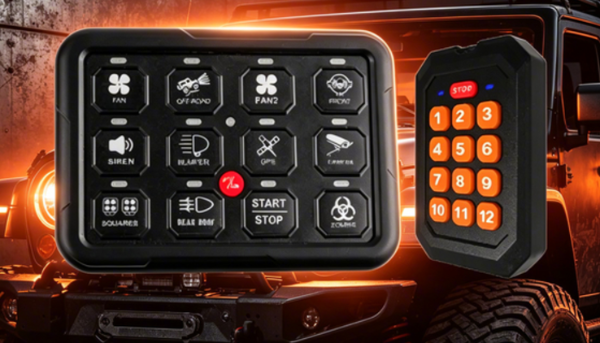
This is where a Metal Switch Panel becomes more than a piece of material surrounding switches. Its design can become part of the interaction between a person and a machine.
In industrial equipment, electrical cabinets, control devices, transportation equipment, and other products, users often need to operate controls while paying attention to the task itself. A well-planned panel can make those actions feel more natural. A poorly arranged one can create unnecessary hesitation.
As equipment design continues to focus on usability as well as function, the relationship between a Metal Switch Panel and user experience deserves closer attention.
Why Does the Design of a Metal Switch Panel Matter to Users?
Users do not interact with a machine only through its internal functions. They also interact with its physical surface.
The switch panel is often one of the most visible areas of equipment. It tells users where controls are located and gives them a clear physical point for interaction. When the panel has a logical layout, people can understand it more easily.
This becomes particularly important when several switches appear together. If every control looks and feels the same, the user may need to stop and look closely before making a selection. A thoughtful panel design can create visual differences between different control areas.
The panel can also influence the overall impression of the equipment. A clean surface with an organized arrangement can make the product easier to understand. A crowded or inconsistent layout may create the opposite feeling.
User experience therefore begins before a switch is pressed. It starts when the user looks at the panel and tries to understand what each control is meant to do.
How Does Switch Placement Influence Everyday Operation?
The position of a switch can have a direct effect on how comfortable the equipment is to operate.
A user should be able to locate an important control without unnecessary movement. Controls that are frequently used may need to be placed where they can be reached naturally. Controls that serve different functions can also be separated visually or physically.
Good placement is not simply about making everything fit on the available surface. It is about understanding how people interact with the equipment.
For example, imagine a control panel with several switches arranged in a long row. If there is little visual distinction between them, the user may need to check each label before making a choice. If related controls are grouped together, the overall layout becomes easier to understand.
A Metal Switch Panel can support this organization through its shape, openings, markings, and surface arrangement.
| Design consideration | Effect on user experience |
|---|---|
| Control grouping | Helps users understand related functions |
| Clear spacing | Makes individual switches easier to identify |
| Logical arrangement | Supports a more natural operating process |
| Visible labels | Helps users recognize functions |
| Accessible positions | Can make repeated operation more convenient |
The goal is not to add more visual elements. It is to create a surface that communicates clearly through its arrangement.
Can the Surface Material Change How a Panel Feels?
The material of a switch panel contributes to the physical experience of using the equipment.
Metal has a distinct feel compared with plastic or other common panel materials. It can give a panel a firm and solid character. When users touch the surface, press a switch, or rest a hand near the controls, that physical response becomes part of the interaction.
This does not mean that metal automatically creates a better experience. The result depends on how the material is formed and finished.
A smooth surface may feel different from a textured one. Rounded edges can feel different from sharp edges. A carefully finished panel can also make the surrounding control area more comfortable to handle.
Surface treatment can influence appearance as well. The panel may need to fit the visual language of the equipment. A simple industrial product may benefit from a restrained appearance, while another product may require clearer visual separation between different control areas.
For this reason, material selection and panel design should be considered together. The metal provides the physical foundation, while the design determines how that material becomes part of the user's interaction.
How Can Visual Design Make Controls Easier to Understand?
People often make decisions based on what they see before they touch a control.
A Metal Switch Panel can use visual organization to guide attention. Labels, symbols, spacing, surface changes, and control grouping can all help users understand the panel.
The key is clarity. A panel does not need to contain many decorative elements. Too much information can make the surface harder to read.
A simple arrangement can often communicate more effectively. Related switches can be placed together. Important controls can receive greater visual attention. Labels can be positioned close to the controls they describe.
This becomes useful when a panel is shared by different users. Not everyone will have the same level of familiarity with the equipment. A clear layout can reduce the amount of time needed to understand the control area.
A practical visual structure might follow this pattern:
- Group related controls. Functions that belong together can be placed in the same area.
- Create clear separation. Space can help distinguish one group from another.
- Keep labels close to controls. Users should not need to search across the panel to understand a switch.
- Maintain visual consistency. Similar functions can use similar design cues.
- Avoid unnecessary decoration. Every visible element should have a reason to be there.
These choices can make a panel easier to read without making the design complicated.
Does Tactile Feedback Affect the User Experience?
Touch is another part of operating a switch panel.
Users do not always look directly at their hands while operating equipment. In some situations, they may focus on a workpiece, display, or surrounding environment. The physical feel of a control can therefore provide useful information.
A switch that has a clear movement can help the user recognize that an action has taken place. The shape of the surrounding panel can also help the hand identify different areas.
The relationship between the switch and the metal panel matters here. The panel provides a stable surface around the control. Its construction can influence how the entire control area feels when touched.
Different controls may also benefit from different physical forms. A frequently used switch may need to be easy to find and operate. A control that should not be activated casually may require a different arrangement.
This shows why user experience is not purely visual. A good control surface combines what users see with what they feel.
The physical interaction can be especially important in environments where users repeat the same actions throughout the working day. Small differences in comfort and ease of operation can become noticeable over time.
How Does Panel Shape Affect Comfort and Interaction?
The overall shape of a Metal Switch Panel can influence how users approach the controls.
A panel with clean edges and a suitable surface layout can make the equipment easier to approach. Its shape may also determine how switches, displays, indicators, and other controls are arranged.
Curved edges, recessed areas, raised sections, or carefully positioned openings can change the way the hand interacts with the panel. These design choices may appear minor, but they can affect everyday handling.
The panel also needs to work with the structure around it. A control surface should not feel disconnected from the rest of the equipment. Its size, orientation, and position can influence whether the user can operate it comfortably.
In some equipment, the panel is positioned vertically. In others, it may be angled toward the user. Different orientations can create different interaction patterns.
This is why panel design should consider the person using the equipment rather than focusing only on the appearance of the finished product.
A useful design question is simple: Can the user approach, understand, and operate the controls naturally?
If the answer is yes, the panel is already supporting the user experience in a practical way.
Why Is Durability Connected With User Experience?
Durability may seem like a separate issue from user experience, but the two are closely connected.
A switch panel is touched repeatedly. It may also be exposed to the surrounding conditions of the equipment. Over time, the surface can experience regular contact, cleaning, handling, and general use.
A panel that remains easy to recognize and operate can provide a more consistent experience. Users do not need to adapt to major changes in the control surface as the equipment ages.
Metal can provide a firm foundation for many types of equipment panels. Its suitability still depends on the design, manufacturing process, surface treatment, and intended environment.
The important point is that durability should not be considered only from a material perspective. The design also needs to support continued usability.
For example, labels should remain understandable. Switches should remain easy to identify. Edges should remain comfortable to handle. The overall surface should continue to make sense to the person using the equipment.
A durable panel is therefore not simply one that stays in place. It is one that continues to support the interaction for which it was designed.
What Should Designers Consider When Creating a Metal Switch Panel?
Creating a Metal Switch Panel involves balancing appearance, operation, structure, and user needs.
The panel should fit the equipment while also making the controls understandable. This requires designers to think about the entire interaction rather than treating each switch as a separate part.
A practical design process can consider several areas:
User needs
Who will operate the equipment? Will the same person use it regularly, or will different users interact with it?
Control frequency
Which switches are used often? Which controls are less common? Their placement can reflect their role.
Visual clarity
Can users quickly understand the relationship between labels, switches, indicators, and control groups?
Physical comfort
Can users reach and operate the controls without awkward hand movement?
Panel structure
Does the metal panel fit securely into the surrounding equipment and provide a suitable surface for the controls?
Maintenance
Can the panel and its controls be accessed when inspection or service is required?
These questions can help turn a basic metal surface into a more considered control interface.
The process also benefits from keeping the design simple. A panel should not make users think harder than the task requires. Clear grouping, sensible spacing, readable markings, and comfortable controls can often do more than complicated visual treatment.
As equipment becomes more interactive, the Metal Switch Panel can play a larger role in shaping how people understand and operate machines. Its surface becomes the point where product design meets everyday human action, making layout, material, touch, and visual clarity important parts of the overall experience.